
Offline conversion tracking is the practice of passing outcomes that happen away from your website, such as a qualified lead, a signed contract or a phone order, back to the ad platform that generated the click. In Google Ads, you do this by storing an identifier at the moment of the click, attaching it to the record in your CRM, and importing the result when the deal progresses. The platform can then report on, and bid towards, revenue rather than form fills.
For B2B businesses, e-commerce brands with phone or trade orders, and charities that convert donors or partners offline, this is the difference between optimising for volume and optimising for value. What follows explains the mechanics, the setup sequence and the data discipline that decides whether the system works.
A website conversion is recorded by a tag in the browser. An offline conversion happens later and elsewhere: a sales call, a demo that becomes a proposal, a purchase in a showroom, a pledge confirmed by a fundraiser. The ad platform cannot see any of it unless you tell it.
Google describes the process in its guidance on offline conversion imports: you save the click identifiers along with the lead information you collect from the person who clicked, then upload the conversion once it occurs offline. The practical consequence is that your CRM, not your website, becomes the system of record for conversion value.
This matters because the leads that look identical at the form stage are rarely equal. In a typical B2B funnel, a small share of enquiries produces most of the pipeline, and an account optimising for form submissions will happily buy more of the cheap, unqualified ones. Feeding back qualified opportunities and closed revenue teaches the bidding algorithm what a good lead looks like.
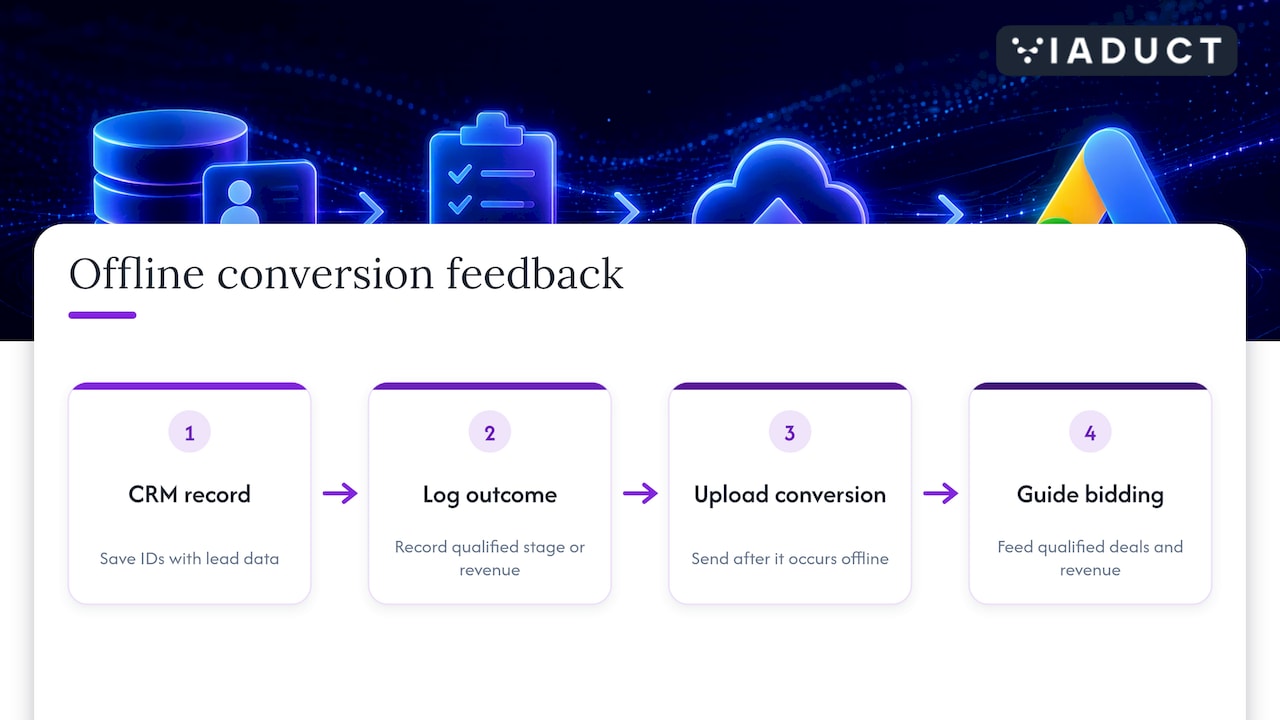
There are two matching methods, and the strongest setups use both.
When someone clicks an ad, Google appends a click ID to the landing page URL. Your site must capture it into a hidden form field or first-party storage, and your CRM must store it against the contact. When the lead becomes a customer, you upload the click ID, the conversion time and the value.
The weakness is fragility. Consent choices, redirects, form tools that strip parameters and multi-page journeys all cause click IDs to go missing, and a missing ID means a lost conversion.
Enhanced conversions for leads is an upgraded version of offline conversion import that supplements the upload with user-provided data, such as an email address, which is hashed before it reaches Google. Google uses that data to attribute the conversion back to the ad interaction, which helps when the click ID is absent.
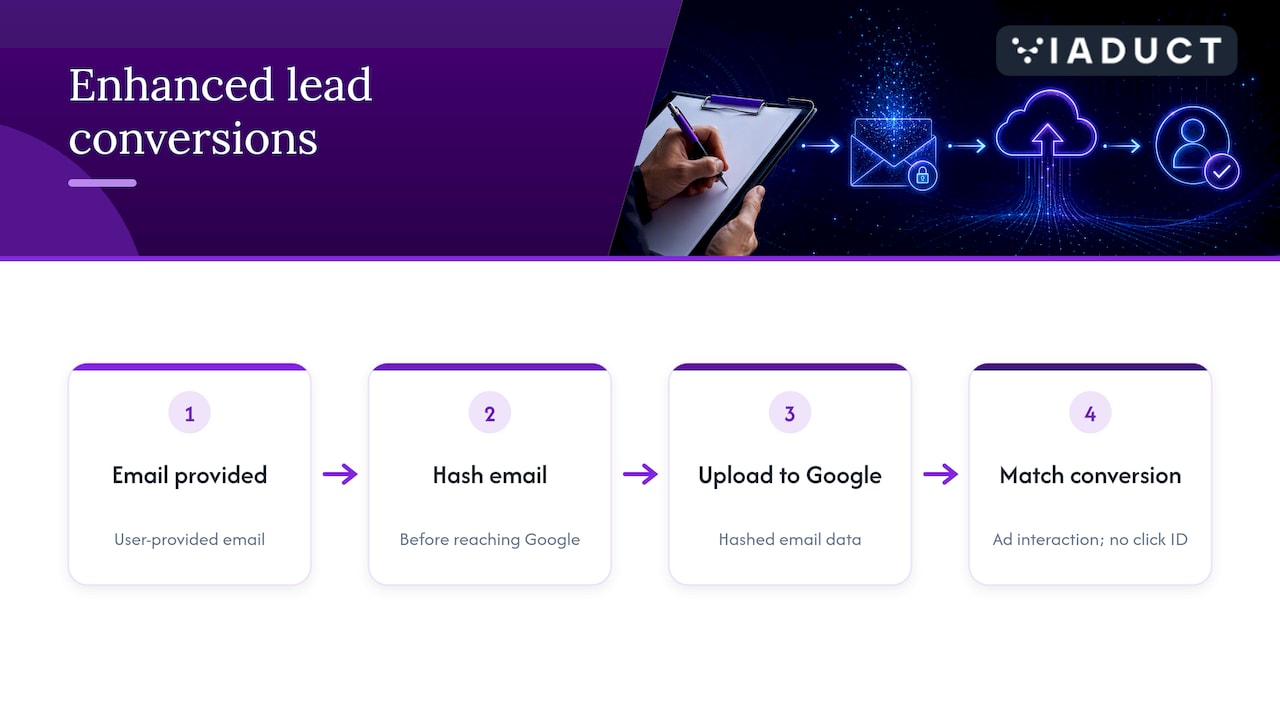
Google’s own documentation reports that advertisers using this approach saw a median 10% increase in conversions compared with standard offline imports, a figure it states on its offline import benefits page. Treat that as an indication of direction, not a forecast for your account, because match rates depend on how much clean contact data you capture.
Google also advises including click IDs in uploads wherever possible, even when a tag collects user-provided data, so that offline conversions remain attributed to specific clicks. Its upgrade guidance says that this is required if you are not using a tag to collect the data.
The technology is rarely the problem. The failures we see are operational, and they are the reason many accounts import data and still see no improvement.
Offline measurement is only as good as the record of what happened to each lead. That means one contact record that carries the first-touch source, the click ID, every stage change with a date, and the final revenue. Teams that also evaluate external specialists to build this often start by reviewing agency profiles and client reviews to compare expertise before commissioning the work.
Once the record is clean, the same data can serve more than Google Ads. It feeds attribution models, informs email nurturing for leads that stall, and shows which content and channels contribute before the final click. Our guides on multi-touch attribution for paid media and fixing B2B attribution models explain how to read the combined picture without over-crediting the last click.
The real payoff arrives when imported outcomes become the bidding objective. With a sufficient flow of qualified stages, you can move campaigns from maximising leads to maximising conversion value, and judge keywords, audiences and creative on pipeline contribution. We set out how that transition is staged over the first three months in our piece on CRM-connected B2B Google Ads, and our Google Ads audit checklist covers the account hygiene that should be in place first.
Conversion rate work belongs in the same loop. When you know which landing pages produce qualified opportunities rather than merely submissions, conversion rate optimisation can target the forms and offers that raise lead quality, not just form completion.
Offline conversion tracking sits inside our approach to revenue attribution, where CRM outcomes are tied back to search, paid and email activity within fixed-scope 90-day sprints. If you want the import, the stage definitions and the bidding changes designed together by senior strategists, our paid media service is the place to start, or you can see the wider Viaduct Generation offer.
Google Ads matches an offline outcome to an earlier ad click using a stored click ID, hashed user-provided data such as an email address, or both. You upload the outcome from your CRM with its time and value, and Google attributes it to the originating campaign.
Enhanced conversions for leads is an upgraded form of offline conversion import. It adds hashed first-party data to the upload, so a conversion can still be matched when the click ID was lost. Google recommends keeping click IDs in uploads as well.
Yes, in principle: a spreadsheet upload works for low volumes. However, it relies on someone recording the click ID and outcome manually, so errors accumulate quickly. Once you handle more than a few leads each week, a CRM with automated sync is far more dependable.
Match it to your real sales cycle. If deals typically close in three months, a short window will drop valid conversions. Set the window from your CRM data on lead-to-close time, not from a platform default.

