
Product feed optimisation means restructuring your feed attributes, titles, images, identifiers and pricing data so shopping platforms can match your products to the right searches and price them correctly in real time. Get it right and you increase impressions, click-through rate and conversion potential, which pushes your return on ad spend up without touching a single bid. Get it wrong and every downstream campaign inherits the mess.
The first move isn’t a strategy deck. It’s an audit.
That triage takes an afternoon. Skipping it costs weeks of wasted spend.
Product feed optimisation improves algorithmic matching and commercial outcomes by fixing attribute quality before adjusting bids, creative or landing pages.
| Point | Details |
|---|---|
| Fix disapprovals first | Clear blocking errors before touching titles, images or custom labels. |
| Front-load titles | Structure titles as brand, product type, key attribute, then variant for better query matching. |
| Segment by hero SKUs | Give manual attention to the small subset of SKUs driving most revenue and impression share. |
| Use holdout testing | Confirm feed changes improve conversion, not just visibility, before scaling catalogue-wide. |
| Get agency support | Viaductgen runs feed audits and rule engineering inside 90-day, senior-led sprints. |
Feeds are no longer a back-office data file. They’re the primary input Google Shopping, Performance Max and every major catalogue placement use to decide what you sell, to whom, and at what price. Smart Bidding and Performance Max campaigns learn from signals inside your feed. Feed a machine-learning system corrupted data (wrong category mapping, stale prices, missing identifiers) and it optimises towards the wrong outcome with total confidence.
The business case is measurable. One documented case study found that structured title and attribute improvements across 130+ SKUs produced a 120% year-on-year increase in organic Shopping revenue, a 107% rise in transactions, and a 138% increase in clicks through Google Shopping, all within a single quarter.
That’s not a marginal gain from a copywriting tweak. It’s what happens when the upstream input gets fixed before anyone touches a bid.
Three things tend to go wrong at once when feeds are neglected:
Fix the feed first. Adjust bids and creative second. Optimising media spend on top of noisy product data just amplifies the noise.
Think of a feed as a spreadsheet: each row is a SKU, each column is an attribute, title, price, availability, image link, and so on. It’s distinct from your product detail page (PDP) and its schema markup, though the two should agree with each other. The feed is what you submit; the PDP is what the shopper lands on. If they contradict each other, expect disapprovals and lost trust signals.
Delivery methods vary by platform and by how often your catalogue changes:
Each channel has its own quirks worth knowing before you build anything. Merchant Center validates GTINs against manufacturer databases and will reject mismatches outright. Meta’s Commerce Manager, by contrast, organises everything around catalogue IDs and expects consistent product grouping for dynamic ads. Build for the strictest platform first and the rest tend to fall into line.
Not every field carries equal weight. Some attributes decide whether you show up in a search at all; others just polish the result once you’re there. Here’s the order that tends to move numbers fastest.
Titles. Front-load the attributes shoppers actually search for: product type, brand, key differentiator, then variant (size, colour, capacity). A template like “[Brand] [Product Type] [Key Attribute] [Variant]” beats a marketing-led title almost every time, because query matching cares about word order and proximity, not tone.
Descriptions. Write unique copy per SKU, not a templated paragraph duplicated across colour variants. Include specification fields (material, dimensions, compatibility) that shoppers actually filter by. Duplicated descriptions don’t just look lazy; they actively hurt matching quality.
Identifiers. GTIN, MPN and brand should be treated as governed data, not optional extras. Missing or incorrect GTINs are one of the most common causes of suppressed listings, and Google’s data specification is explicit that accurate identifiers correlate with higher click volume. Set a variant ID convention early and never let two SKUs share one.
Category mapping. Go as deep as the Google product category taxonomy allows rather than stopping at a top-level node, and keep your custom product_type field aligned with your own site navigation. Shallow category mapping is one of the quietest ways to lose relevance in Shopping auctions.
Images. The primary image should be clean, on a plain background, and free of promotional text or watermarks, per platform policy. Use additional_image_link for lifestyle shots, alternate angles and packaging, since these often influence conversion more than the primary image does.
Price and availability. These fields need the shortest refresh cadence of anything in the feed. A mismatch between feed price and landing page price is one of the fastest routes to a disapproval, and it damages shopper trust even when the platform doesn’t catch it.
Custom labels. Use the five available custom_label slots to encode margin band, sales velocity, seasonal relevance or promotional state. This is what lets you segment bidding by profitability rather than by category alone.
Pro Tip: Build your title template as a spreadsheet formula before you touch the feed itself. Test it against your ten highest-traffic SKUs and read the output aloud. If it sounds like a barcode, rewrite it.
A 200-SKU catalogue and a 200,000-SKU catalogue need completely different playbooks. Manual attribute editing works fine at the smaller end; it collapses immediately at scale. The fix is segmentation, not more hours.
Start by splitting the catalogue along four axes:
These get manual, hands-on attention: bespoke titles, curated imagery, weekly monitoring.
For everything else, rule-based transforms and supplemental feeds scale far more reliably than manual edits as catalogue size grows, because a single rule change propagates instantly across thousands of rows rather than requiring individual updates.
Feed work fails when it’s done in the wrong order. Fixing a title before clearing a disapproval is wasted effort, since the SKU won’t serve regardless of how good the copy is. Platform diagnostics follow a clear hierarchy: disapprovals block serving entirely, warnings degrade performance without blocking it, and suggestions are optional polish.
Supplemental feeds are the fastest lever here. They let you override titles, insert missing GTINs or adjust custom labels without touching the primary feed, though they can’t add new products to the catalogue.
| Audit stage | What to check | Typical fix time |
|---|---|---|
| Disapprovals | Missing GTIN, image policy violation, price mismatch | Same day |
| Warnings | Thin titles, shallow category mapping | 1 to 2 weeks |
| Suggestions | Additional images, extended descriptions | Ongoing |
| Holdout test | Control vs optimised segment, CTR and conversion rate | 2 to 4 weeks |
Set a rollback trigger before you launch, not after. If the optimised segment underperforms the control on conversion rate for two consecutive weeks, revert and re-diagnose rather than waiting it out.
Feed quality decays the moment nobody owns it. The most common failure mode isn’t a bad initial setup, it’s drift: a product manager changes a price on the site and forgets the feed follows a different update schedule, or a new SKU launches without a GTIN assigned.
A workable RACI splits responsibility clearly:
Governance gaps, not ad settings, are the real cause of underperformance for a large share of merchants running Shopify catalogues, according to one UK-focused review of feed setups.
Run a weekly review of critical SKUs (hero products, anything with a live disapproval) and a monthly retrospective covering the whole governance model. Define precedence explicitly: when the primary feed and a supplemental feed disagree, state in writing which one wins.
Pro Tip: Write the precedence rule into your feed documentation as a single sentence: “Supplemental feed overrides primary feed for price and availability only.” Ambiguity here causes more silent errors than any single attribute mistake.
Track impressions, CTR, conversion rate, revenue per click and ROAS, in that order. Impressions and CTR tell you whether the feed is now matching better; conversion rate and revenue per click tell you whether that traffic is worth anything. Watch Merchant Center’s diagnostics and competitive visibility reports weekly during the first month after a change.
Mixed signals are common: CTR rises but conversion stays flat, which usually means the title is now matching the right query but the landing page or price doesn’t back it up. Structuring optimisation as controlled experiments with holdout groups prevents you from mistaking a visibility gain for a profit gain.
Feed work sits inside the second and third phases of Viaductgen’s Growth Engine: AI-Powered Intelligence surfaces the disapprovals and mismatches an audit would otherwise take days to find manually, and AI-Amplified Execution applies the rule-based fixes at scale before a senior strategist reviews hero SKUs by hand.
A typical 90-day sprint looks like this:
Case outcomes from engagements like the FMIS case study reflect how Viaductgen’s optimisation methodology applies this sequence in practice.
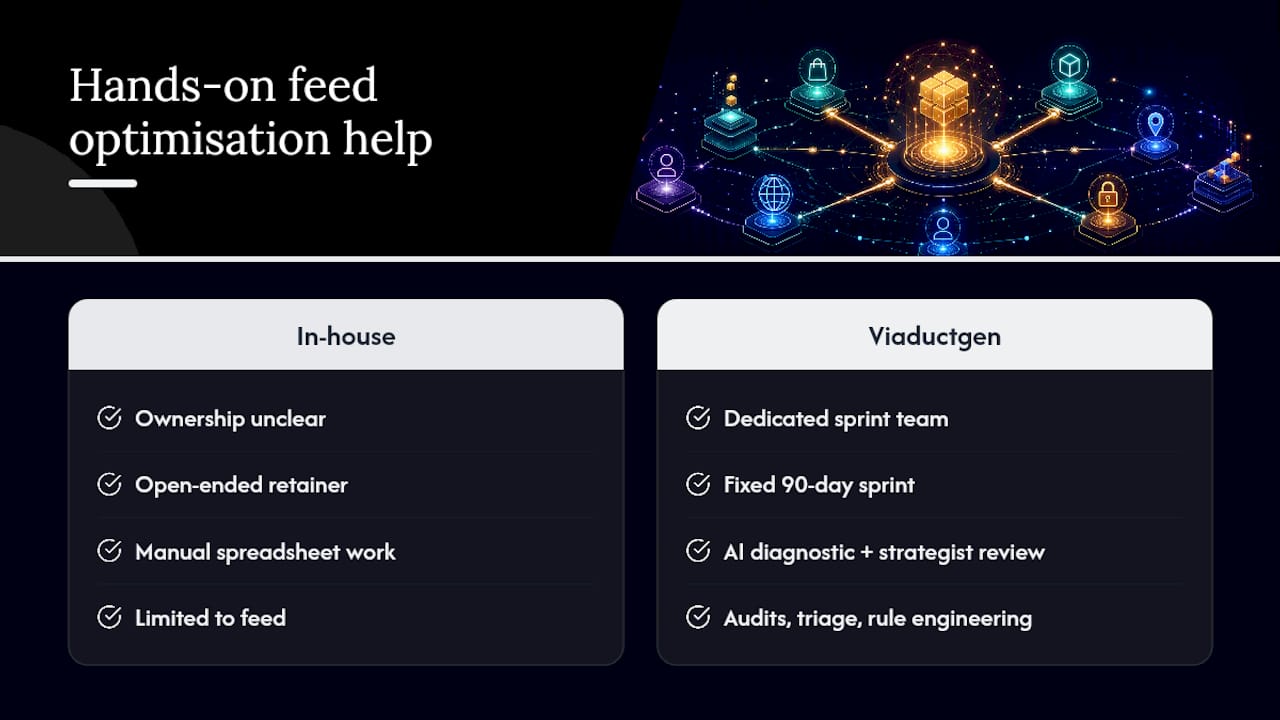
If you’ve read this far and you’re staring at a catalogue with 40,000 SKUs and no one clearly owns the title template, you’re not short on knowledge, you’re short on hours. Viaductgen runs feed audits, triage and rule engineering as part of the same AI-powered process we described above, delivered inside fixed 90-day sprints rather than an open-ended retainer.
The difference from doing this in-house isn’t the checklist, it’s the speed of the AI-assisted diagnostic pass and the senior strategist reviewing hero SKUs by hand rather than a junior working through a spreadsheet alone. That’s how we use AI in client work, applied specifically to catalogue and search performance.
For a broader view of how feed and search work connect, our search, AEO and GEO services cover the layer above the feed, where matching, structured data and AI-driven discovery meet. If you’re weighing this against building the capability internally, get in touch and we’ll walk through what a 90-day sprint would actually look like for your catalogue.
Product optimisation means improving how a product’s data, listing and presentation match what shoppers search for, covering titles, images, pricing, identifiers and category mapping across every sales channel.
Align your product page copy, images and price exactly with your feed data, add specification details shoppers filter by, and make sure schema markup matches the feed’s category and identifier fields.
Start with an audit of disapprovals and warnings, then apply consistent title templates, correct GTINs and deep category mapping, and refresh price and availability fields on a short cycle to avoid mismatches.
Segment your catalogue by revenue contribution, margin and stock cover to identify hero SKUs, then apply custom labels so bidding can be weighted towards the products that actually drive profit.
If your catalogue is large or your team lacks dedicated feed ownership, agency-led support, like Viaductgen’s 90-day sprints, can apply audit, triage and rule engineering faster than building the capability from scratch.

