
Keyword mapping is the process of assigning each keyword cluster to a single page on your site, so every topic has one authoritative home and ranking conflicts are minimised. A well-built map tells you what to create, what to optimise, and what to consolidate, and it doubles as your editorial backlog. According to Semrush’s keyword mapping guide, a functional map tracks primary and secondary keywords, monthly volume, keyword difficulty, search intent, target URL, and page status, and should be reviewed at least every three months.
A practical keyword map captures:
Copy the free mapping spreadsheet template linked in the tools section below and fill one row per cluster as you work through the steps.
Keyword mapping works when you cluster first, assign one topic to one page, and treat the status column as your editorial queue rather than a filing exercise.
| Point | Details |
|---|---|
| Cluster before you assign | Group keywords by SERP overlap before matching them to URLs to avoid thin pages and cannibalisation. |
| One topic, one page | Every cluster needs a single target URL; two pages competing for the same cluster split authority and weaken both. |
| Prioritise by business fit | Score clusters by traffic potential and commercial relevance, not volume alone, to order your editorial backlog. |
| Review every three months | Quarterly checks catch rank drift, new cannibalisation, and stale status fields before they compound. |
| Viaductgen for faster outcomes | Viaductgen’s 90-day SEO sprints deliver a mapped priority list, implementation support, and commercial measurement from day one. |
The clearest benefit is cannibalisation prevention. When two pages target the same keyword, Google splits authority between them and often ranks neither well. A map forces a one-topic-one-page rule before that split happens.
Beyond that, the benefits compound quickly:
Two scenarios illustrate the stakes. A SaaS company with separate “pricing” and “plans” pages often finds both ranking weakly for the same transactional queries, splitting click-through rate and confusing buyers. A single consolidated page, chosen by the map, fixes the split. Separately, a B2B services firm running a content audit discovers it has no page covering a core service pillar, despite publishing dozens of supporting blog posts. The map surfaces that gap immediately because no cluster row has a valid target URL.
Both problems cost traffic and conversions. Mapping catches them before they compound.
Backlinko’s keyword mapping guide recommends clustering first to avoid thin pages, and the template columns below reflect that logic. Each field earns its place.
| Column | What it captures | Why teams use it |
|---|---|---|
| Primary keyword (pillar) | The head term that defines the page’s topic | Sets the page’s title, H1, and meta focus |
| Secondary keywords (cluster) | Related terms and variations the page should also rank for | Informs subheadings, body copy, and FAQ sections |
| Keyword variations | Long-tail and synonym variants | Feeds internal link anchor text and related-content ideas |
| Monthly volume | UK search volume from your chosen tool | Sizes the traffic opportunity per cluster |
| Keyword difficulty (KD) | Competitive score (0–100) | Helps prioritise quick wins versus long-term investments |
| Search intent | Informational / commercial / transactional / navigational | Determines page format and CTA depth |
| Traffic potential (TP) | Estimated monthly clicks if ranked at position 1 | More reliable than volume alone for forecasting |
| Target URL | The page assigned to own this cluster | Prevents two pages competing for the same terms |
| Page status | Create / Optimise / Consolidate / No Action | Acts as the editorial action queue |
| Assignee | Person responsible for the next action | Keeps accountability clear in team workflows |
| Last updated | Date of last map review | Flags stale rows at the quarterly review |
| Notes | Redirect plans, content briefs, SERP feature observations | Captures context that does not fit other columns |
Sample filled row:
Primary keyword: keyword mapping | Secondary: how to create a keyword map, SEO keyword mapping | Volume: 1,600/mo (UK) | KD: 52 | Intent: Informational | TP: 900 | URL: /blog/keyword-mapping/ | Status: Optimise | Assignee: Content lead | Updated: March 2026
That single row tells a content lead exactly what the page needs to do, how competitive the space is, and what action to take next. No ambiguity, no separate briefing document required.
Pro Tip: Add an “AI search action” column if you are tracking Answer Engine Optimisation (AEO) visibility separately from classic SERP rankings. Semrush notes that AI-native search environments decompose queries into multiple sub-prompts, so a cluster mapped to a pillar page is better positioned to satisfy that fan-out than a page targeting a single keyword.
Backlinko’s guide frames the workflow as cluster-first, then assign. That order matters: clustering before URL assignment prevents the common mistake of forcing keywords onto pages that do not match intent.
Prepare your inputs. Pull your full keyword list (from Semrush, Ahrefs, or Mangools), export your current sitemap or content inventory, and note each page’s existing URL and rough topic. You need both lists open simultaneously.
Cluster by intent using SERP overlap. Group keywords that return the same top-ranking pages. If “keyword mapping template” and “how to create a keyword map” share four of the same top-ten results, they belong in the same cluster. For large lists, use a clustering tool to automate grouping; for lists under 200 keywords, manual clustering in a spreadsheet is fast enough. SERP-based clustering is the most accurate method but slower; tool-based clustering trades some precision for speed at scale.
Choose the parent keyword and record metrics. Within each cluster, pick the term with the highest traffic potential as the primary keyword. Record volume, KD, and TP from your tool. Traffic potential is a more reliable forecast than raw volume because it accounts for click-through rate across all ranking positions.
Assign each cluster to a URL. Match the cluster to an existing page where intent aligns. If no page fits, mark the status as “Create” and leave the URL field blank until the page is built. Set the status, add the assignee, and date the row.
Prioritise and schedule. Sort “Optimise” rows by traffic potential multiplied by a simple business-fit score (0–3: 0 = no commercial relevance, 3 = core revenue topic). Rows scoring highest go into the next sprint. For each “Optimise” row, note the first on-page actions: update the title tag and H1 to include the primary keyword, revise the introduction, adjust subheadings to cover secondary terms, and add internal links from supporting pages.
Pro Tip: Before assigning a URL, run a quick site:yourdomain.com "keyword phrase" search and an inurl:keyword check. Google’s own index often reveals pages you forgot existed, including old campaign landing pages or duplicate category URLs that would cannibalise the cluster you are about to assign.
When two or more pages look like plausible homes for the same cluster, use this checklist to pick the right one:
The page that wins the most of those five criteria gets the cluster. Once you have chosen, update the map and move to resolution if the losing page was also targeting those keywords.
Ahrefs’ keyword mapping guide outlines the standard resolution tactics:
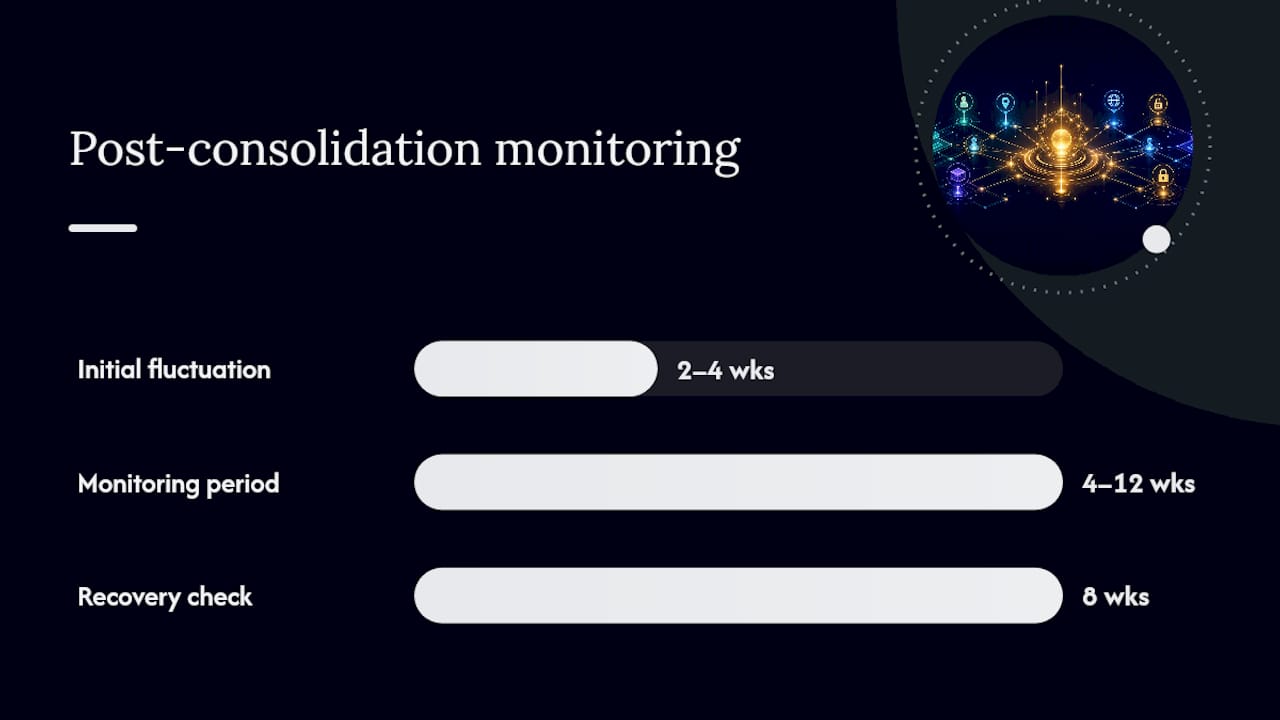
After a consolidation, monitor rank volatility for four to twelve weeks. Expect some fluctuation in the first two to four weeks as Google recrawls and re-evaluates. If rankings for the consolidated page drop and do not recover within eight weeks, check that the redirect is implemented correctly and that the merged content genuinely covers the cluster’s full intent. Viaductgen’s site migrations guide covers the technical redirect workflow in detail.
A map that is not maintained becomes a liability. Stale status fields mislead teams; outdated volume figures skew prioritisation. The fix is a simple cadence with clear triggers.
Recommended review schedule:
On-page optimisation checklist for a newly assigned page:
Governance basics: assign one map owner (usually the SEO lead or content strategist), record the review date in the map header, and use the status workflow (Create / Optimise / Consolidate / No Action) as the single source of truth for the editorial calendar. Track three KPIs per mapped page: organic rank for the primary keyword, organic traffic, and goal completions. Those three numbers tell you whether the map’s assignment is working.
The right tool depends on your budget and the size of your keyword list. For most UK teams, a combination of one paid research tool and a spreadsheet covers the full workflow.
For sector-specific mapping examples, the content clusters in SEO guide illustrates how pillar and cluster relationships work in a professional services context, which translates directly to B2B and e-commerce mapping workflows.
Pro Tip: Start with the free spreadsheet template and one tool. Adding more tools before the process is established creates data conflicts and slows the first mapping session. Complexity is a problem to solve later, not on day one.
The honest answer depends on three variables: site scale, in-house capability, and how quickly commercial outcomes need to materialise.
Map it yourself when:
Consider an agency when:
A well-run agency engagement delivers more than a spreadsheet. Expect a mapped priority list, an optimisation roadmap tied to traffic and revenue targets, implementation support across on-page and technical changes, and measurement that tracks rank, traffic, and conversions rather than just outputs.
When briefing an agency, bring your current sitemap, your top twenty revenue-generating pages, any existing keyword data, and a clear statement of your commercial targets for the next twelve months. That brief cuts scoping time and gets the engagement to implementation faster.
Pro Tip: Ask any agency you are evaluating to show you a sample keyword map from a previous engagement (anonymised). The map’s structure reveals how the agency thinks: does it show traffic potential alongside volume? Does it include a status column? Does it separate pillar keywords from cluster variations? A flat list of keywords with no intent or URL column is a red flag.
For teams tying mapping directly to B2B revenue targets, Viaductgen’s B2B SEO strategy guide covers how to connect keyword priorities to pipeline metrics.
Keyword mapping is where strategy meets execution, and the gap between a completed spreadsheet and ranked pages is where most in-house teams stall. Viaductgen’s SEO service closes that gap through AI-native research, senior-led prioritisation, and sprint-based implementation with commercial targets built in from day one.
An engagement starts with a full keyword and content audit, producing a mapped priority list that distinguishes quick-win optimisations from longer-term content builds. Every row in the map is tied to a traffic potential and business-fit score, so the editorial backlog is ordered by revenue impact rather than volume alone. Implementation support covers on-page changes, internal linking, and technical consolidations, with rank, traffic, and conversion tracking throughout.
If your site has cannibalised pages, an unmapped content archive, or a content plan that is not connected to search demand, see how Viaductgen works and get in touch to discuss a 90-day growth sprint.
The following sources informed this guide and are worth bookmarking for deeper reference:
Keyword mapping is the process of assigning a keyword cluster to a specific page so each topic on your site has one authoritative home. It prevents cannibalisation, clarifies editorial priorities, and informs internal linking decisions.
A keyword map typically organises keywords into four types by intent: informational (research queries), commercial (comparison queries), transactional (purchase or sign-up queries), and navigational (brand or URL queries). Each type determines the page format and call-to-action depth.
The standard columns are primary keyword, secondary keywords, monthly volume, keyword difficulty, search intent, traffic potential, target URL, page status (Create / Optimise / Consolidate / No Action), assignee, and last updated. The status column functions as the editorial action queue.
Review the map at least every three months as a baseline. Trigger an out-of-cycle review when rankings shift significantly, a product launches, or a major algorithm update changes SERP features for your key clusters.
Sites with hundreds of pages, limited in-house SEO resource, or a defined commercial growth target that needs to be met within a fixed timeframe benefit most from an agency engagement. Viaductgen’s 90-day sprints deliver a mapped priority list, implementation, and commercial measurement rather than a spreadsheet alone.

